创建 ClickOnce 包
支持使用 ClickOnce 将桌面应用发布到 Windows 环境。
配置
发布时的配置如:
 1
 2
 3
 4
 5
 6
 7
 8
 9
10
11
12
13
14
15
16
17
18
19
20
21
22
23
24
25
26
27
28
29
30
31
32
33
34
35
36
37
38
39
40
| <Project>
<PropertyGroup>
<ApplicationVersion>5.0.0.*</ApplicationVersion>
<PublishDir>D:\Dt\Publish\Desktop\</PublishDir>
<ApplicationRevision>0</ApplicationRevision>
<BootstrapperEnabled>True</BootstrapperEnabled>
<Configuration>Release</Configuration>
<CreateWebPageOnPublish>False</CreateWebPageOnPublish>
<GenerateManifests>true</GenerateManifests>
<Install>True</Install>
<InstallFrom>Disk</InstallFrom>
<IsRevisionIncremented>True</IsRevisionIncremented>
<IsWebBootstrapper>False</IsWebBootstrapper>
<MapFileExtensions>True</MapFileExtensions>
<OpenBrowserOnPublish>False</OpenBrowserOnPublish>
<Platform>x64</Platform>
<PublishProtocol>ClickOnce</PublishProtocol>
<PublishReadyToRun>False</PublishReadyToRun>
<PublishSingleFile>False</PublishSingleFile>
<RuntimeIdentifier>win-x64</RuntimeIdentifier>
<SelfContained>True</SelfContained>
<SignatureAlgorithm>(none)</SignatureAlgorithm>
<SignManifests>False</SignManifests>
<SkipPublishVerification>false</SkipPublishVerification>
<TargetFramework>net9.0-desktop</TargetFramework>
<UpdateEnabled>False</UpdateEnabled>
<UpdateMode>Foreground</UpdateMode>
<UpdateRequired>False</UpdateRequired>
<WebPageFileName>Publish.html</WebPageFileName>
</PropertyGroup>
<ItemGroup>
<!-- This section needs to be adjusted based on the target framework -->
<BootstrapperPackage Include="Microsoft.NetCore.DesktopRuntime.8.0.x64">
<Install>true</Install>
<ProductName>.NET Desktop Runtime 8.0.10 (x64)</ProductName>
</BootstrapperPackage>
</ItemGroup>
</Project>
|
项目模板中将以上配置保存在 Properties\desktop-pub.props 文件,在项目文件xxx.csproj中导入该配置
 1
 2
 3
 4
 5
 6
 7
 8
 9
10
11
12
13
14
15
16
17
18
19
20
21
22
23
24
25
26
27
28
| <Project Sdk="Dt.Sdk">
<PropertyGroup>
<IsExe>true</IsExe>
<!-- 主题颜色,无#前缀,logo图标、启动页背景色 -->
<ThemeColor>1BA1E2</ThemeColor>
<!-- WinAppSdk时和Package.appxmanifest模板生成AppxManifest.xml -->
<ApplicationTitle>搬运工</ApplicationTitle>
<ApplicationId>dt.Demo</ApplicationId>
<ApplicationDisplayVersion>1.0</ApplicationDisplayVersion>
<ApplicationVersion>1</ApplicationVersion>
<ApplicationPublisher>Daoting</ApplicationPublisher>
<Description>搬运工样例.</Description>
</PropertyGroup>
<!-- 发布时配置 -->
<Import Project="Properties\win-pub.props" Condition="$(IsWinAppSdk) AND '$(Configuration)' == 'Release'" />
<Import Project="Properties\android-pub.props" Condition="$(IsAndroid) AND '$(Configuration)' == 'Release'" />
<Import Project="Properties\desktop-pub.props" Condition="$(IsDesktop) AND '$(Configuration)' == 'Release'" />
<ItemGroup>
<ProjectReference Include="..\Demo.Base\Demo.Base.csproj" />
<ProjectReference Include="..\Demo.UI\Demo.UI.csproj" />
<ProjectReference Include="..\Demo.Crud\Demo.Crud.csproj" />
<ProjectReference Include="..\Demo.Lob\Demo.Lob.csproj" />
</ItemGroup>
</Project>
|
生成
使用以下命令,可以自定义输出路径
1
| msbuild /m /r /target:Publish /p:Configuration=Release /p:TargetFramework=net9.0-desktop
|
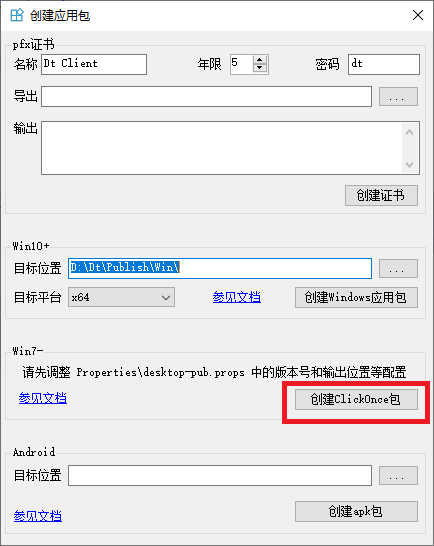
也可使用搬运工的VS扩展完成此过程

发布
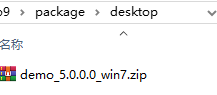
找到应用程序包目录,将整个目录压缩成.zip包,并将zip包复制到 cm 服务或单体服务的package/desktop目录下
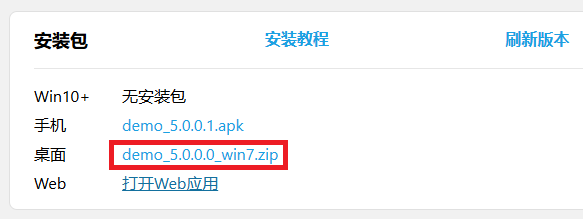
启动cm 服务或单体服务,浏览默认首页,如 https://localhost:1234/,查看安装包版本是否正确
发布完毕
安装
- 浏览服务的默认首页
- 点击
桌面所在行的.zip链接,下载压缩包,解压并点击setup.exe安装 - 安装成功后会自动启动app
 搬运工
搬运工